Standalone fuel control
FT4000Fuel Management System
A robust fuel management terminal designed to give commercial transport organisations tighter control and clearer accountability around authorised onsite fuelling.
4 pumpsSimultaneous pump control
2,000+Transactions between downloads
24/7Browser-based FMO access
Fueltek product range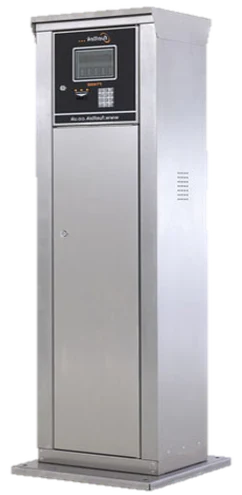
What it is. What it does. Where it fits.
A clear overview of the product, its role within a Fueltek fuel management system, and the applications it is designed for.
01What is it?
A standalone fuel access control terminal. It is the user-facing control unit, not the fuel pump itself.
02What does it do?
It checks the selected identification method, enables an authorised dispense and records the transaction.
03Who normally uses it?
Fleet, depot and commercial sites that already have pumps or want the control terminal positioned separately.
04What does it control?
Up to four pumps simultaneously, together with the selected keypad, tag or card access workflow.
05Where does it fit?
At the fuelling point between the user and the pumps, with transaction information passed to Fueltek FMO.
Product overview
Control built for the site.
The FT4000 combines a Fuel Access Control Terminal (FACT) at the fuelling location with Fueltek FMO browser-based software. It controls who can dispense fuel, records the transaction data and makes management information available from any internet-connected location.
Key capabilitiesWhat the FT4000 provides
- Controls up to four pumps simultaneously.
- Heavy-duty keypad for odometer readings, driver IDs, fleet numbers, job codes and other site-defined inputs.
- Available with full alphanumeric, multi-choice alphanumeric or numeric keypad layouts.
- Highly visible quarter-VGA backlit graphics display with clear user messages.
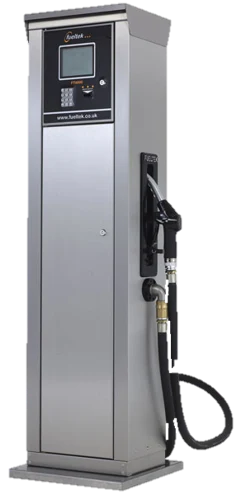
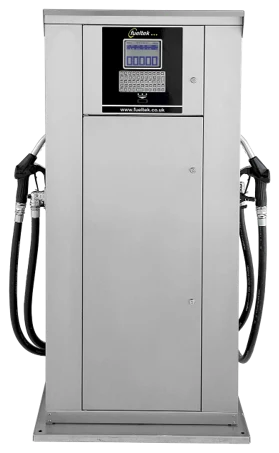
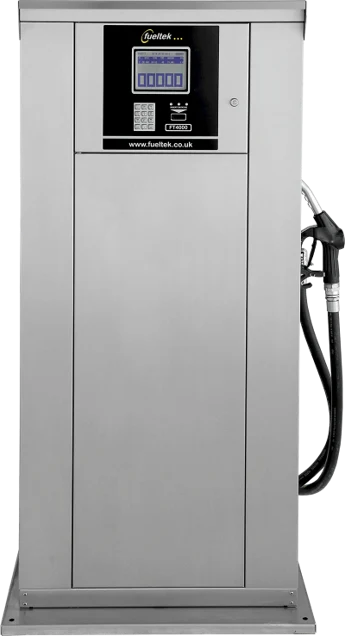
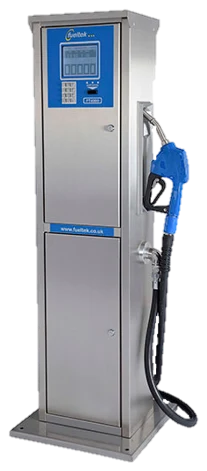
- Available in pedestal-mounted or wall-mounted formats.
- Vehicle and driver messaging can be sent from Fueltek FMO to the terminal.
- Non-volatile memory retains transaction data during a mains power failure.
Access methodsAccess methods
Secure identification at the point of fuelling.
- Datatag, Datadisk, Datacard or magnetic-stripe card.
- Fueltek Datatag is the preferred read/write method.
- Datatag authentication uses a cryptographic algorithm.
- Minimum 100,000 read/write cycles and at least ten years of data retention.
- No moving parts, reducing long-term maintenance.
Storage and resilienceStorage and resilience
Built to protect transaction data.
- Minimum primary capacity of 2,000 transactions between downloads.
- Lookup tables, fleet lists and transaction storage can be expanded.
- Data is held in non-volatile memory without battery backup.
Reporting and communicationsReporting and communications
Connect the FACT to Fueltek FMO.
- Generate, view or print reports from any internet-connected location.
- Commonly connected using GPRS.
- Can form part of a LAN or WAN.
- Bluetooth, Wi-Fi, RS232 and RS485 connectivity can also be used where required.
Technical information
Product specification.
Core configuration, construction and operating details taken from the supplied Fueltek product sheet. Final specifications can be confirmed for the exact site application.
Terminal specification
- Pump control
- Up to four pumps simultaneously
- Display
- Quarter-VGA backlit graphics display
- Keypad
- Full alphanumeric, multi-choice alphanumeric or numeric
- Mounting
- Pedestal or wall mounted
- Primary transaction memory
- Minimum 2,000 transactions between downloads
- Power-loss protection
- Non-volatile memory retains all stored data
Fueltek FMO functions
- Communications
- Communications between Fueltek FMO and the FACT
- Access devices
- Programming Datatags and other access devices
- Tables
- Driver, fueller and lockout table maintenance
- Reporting
- Run and customise operational reports
- Stock control
- Fuel stock management and monitoring
- Data protection
- Periodic data backup
Original product information
View the full FT4000 product sheet.
The original two-page Fueltek PDF is included for the complete source layout, diagrams and product information.
Product specifications and available options may be updated or tailored to the installation. Contact Fueltek to confirm the final configuration.